Coming soonComing soon. NextiaInvoices opens to new customers soon — pricing and screenshots are final-draft, and sign-up is not open yet.

Questions? Talk to us →
Nextia Invoices
Invoicing for Canadian small businesses

Invoices that look professional. Money that goes straight to you.

Send quotes your clients accept online, branded invoices with GST/HST/QST done right, and reminders that chase for you. Get paid by e-transfer, cheque or your own payment link. We take 0% of what you invoice.

Free plan, forever · 14-day Pro trial · No credit card · One Nextia account — sign in with Google, Microsoft, Apple or email

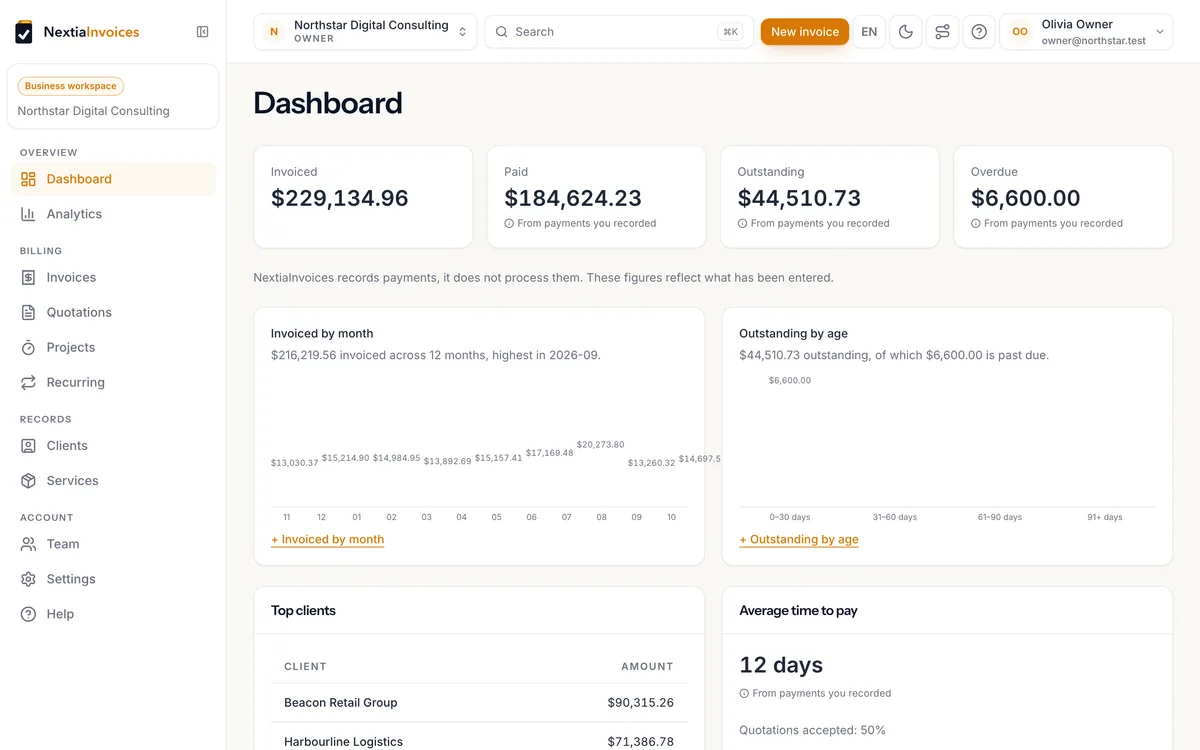
NextiaInvoices dashboard showing invoiced, paid, outstanding and overdue totals, invoiced by month and outstanding by age
The problem

Invoicing software has two settings: too basic, or too much.

A spreadsheet and a Word template get you a document that looks like a spreadsheet and a Word template. A full accounting suite gets you a chart of accounts, a bank feed, a reconciliation screen, and a monthly bill for features you will never open. Both take longer than the invoice is worth.

The manual way

Duplicate last month’s file. Change the number — hope you did not reuse one. Recalculate the tax by hand. Export a PDF. Write the email. Remember to chase it in three weeks.

The accounting-suite way

Learn a ledger you did not ask for. Discover that sending invoices is fine, but the tier with your tax setup costs triple. Get charged a percentage of every payment on top.

The way this should work

Pick a client. Pick a service. Send. The document is branded, the tax is right, the number is unique, and your client can pay or accept from their phone.

How it works

Three steps, and the third is the only one you repeat.

  1. 01

    Set up your business once

    A step-by-step wizard — never a wall of settings. Your details, your logo and colours, your taxes, your invoice defaults. It saves as you go and skips what does not apply to you.

  2. 02

    Save what you sell

    Add the services you actually offer, priced by the hour, day, project or session, with the right taxes attached. From then on they go onto an invoice in one click.

  3. 03

    Invoice, send, get paid

    Build the invoice, preview the PDF, and send it. Your client opens a secure link, downloads the PDF and pays you directly — nothing is routed through us.

The payment boundary

Your provider. Your money. Our zero percent.

NextiaInvoices records payments; it does not process them or hold your money. Your client pays you directly, and we never take a share of what you bill.

Add your own payment link once — a Stripe or Square payment link, a PayPal page, anything over HTTPS — with instructions for e-transfer or cheque. It appears as a Pay now button in the invoice email, the client view and the PDF. Online card payments through your own Stripe, Square or PayPal account are coming soon.

How payments work →

Works with the link you already have

  • Stripe Payment Link
  • Square Payment link
  • PayPal Invoice or payment link
  • Helcim Payment page
  • Wise Payment request
  • Interac e-Transfer Bank instructions
  • Bank transfer Written instructions
  • Any HTTPS URL Your provider, your choice

For a payment link we store only the public URL you choose — no credentials. Provider names are trademarks of their owners.

What you get

Everything invoicing needs. Nothing accounting insists on.

Invoicing

Build it from what you already sell.

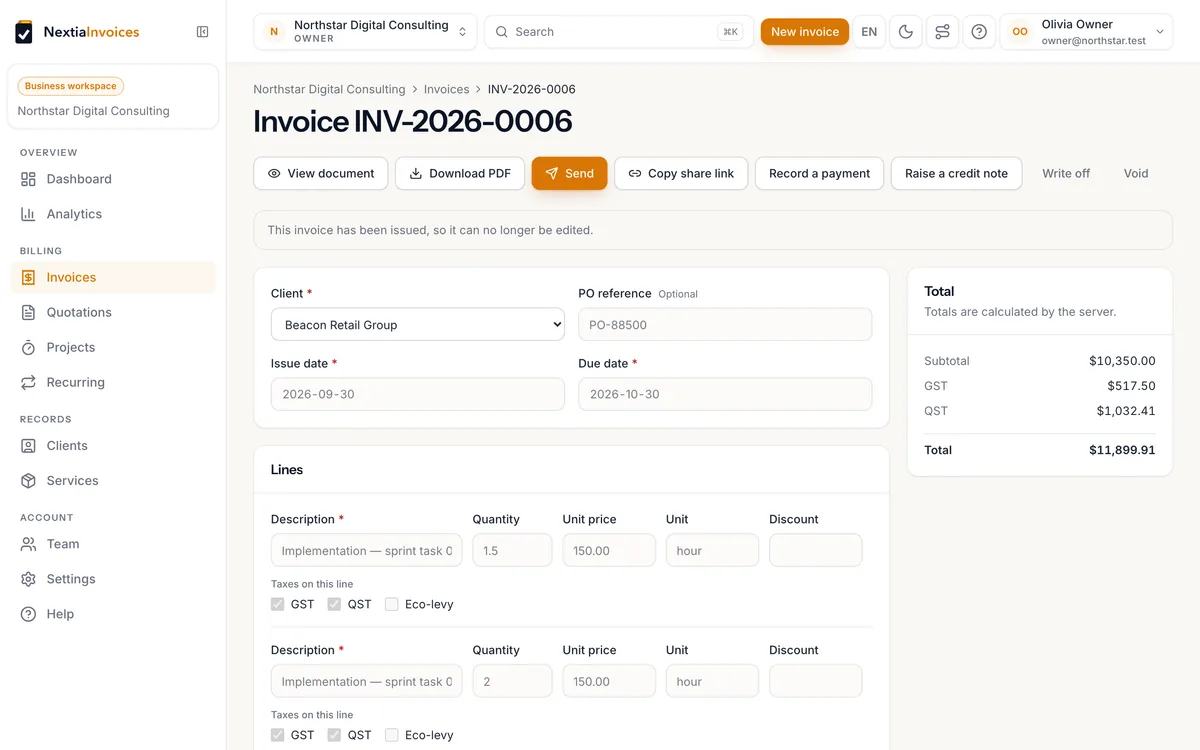
Drop in a saved service, adjust the line if this job was different, and watch GST, HST or QST and the totals resolve as you type. Issue it and the document locks — corrections go through credit notes instead of quietly rewriting history.

More on invoicing →
Invoice editor with line items, a live tax breakdown and running totals
Documents & delivery

A document your client can open on a phone.

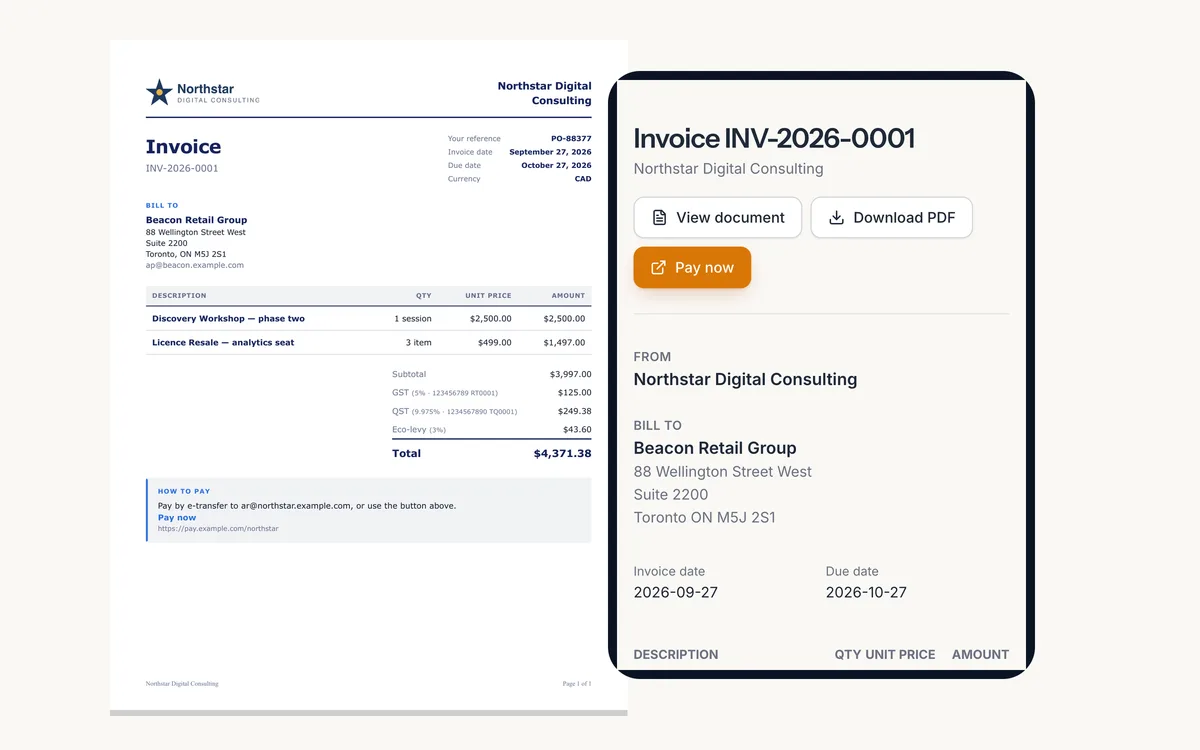
Your logo, your colours, your terms on a print-ready PDF, delivered with a secure link that shows that one invoice — and a client portal that shows everything you have sent them.

More on documents →
Branded invoice PDF beside the same invoice opened on a phone with a Pay now button
Recurring & reminders

Retainers that bill themselves.

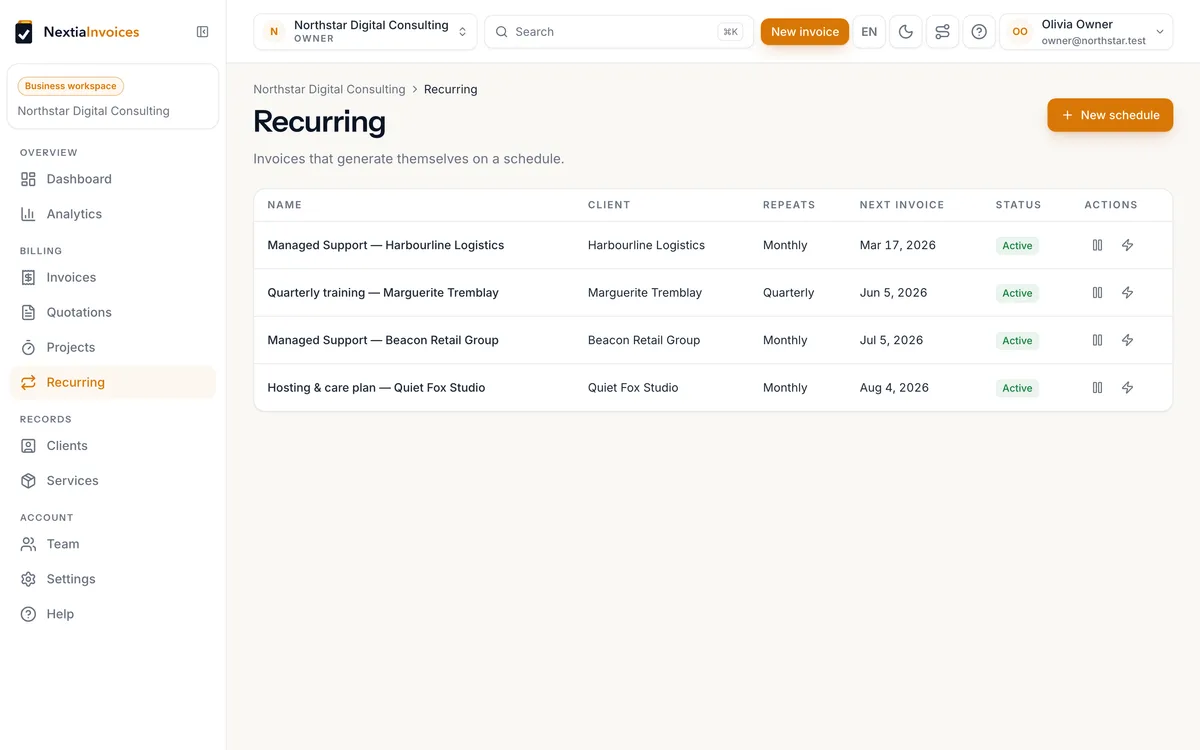
Set a frequency and a due-date rule, then decide whether each run sends automatically or waits for you as a draft. Overdue reminders go out on your schedule, with quiet hours and time zones respected.

More on recurring →
Recurring schedules with client, frequency, next invoice date and status
Dashboard & analytics

Four numbers, then the detail if you want it.

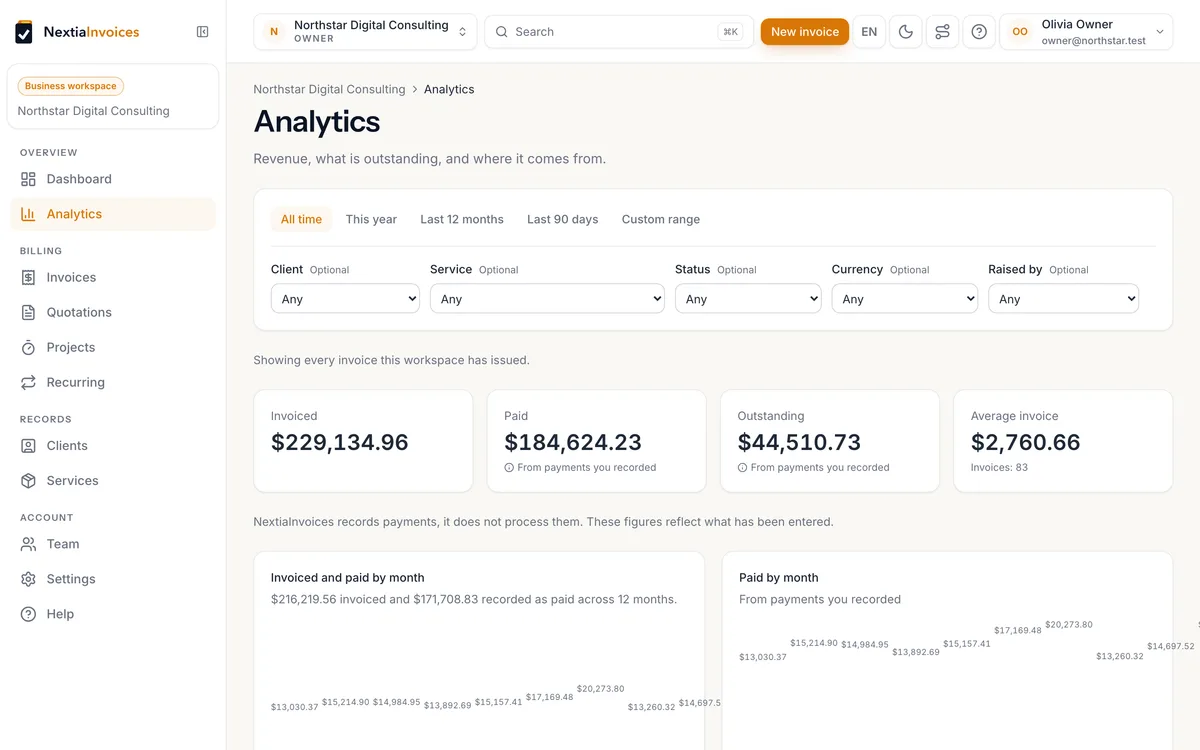
Invoiced, paid, outstanding, overdue. Then revenue by client and service, outstanding ageing, quotation acceptance rate, and how long people actually take to pay you. Figures that depend on manually recorded payments say so.

More on analytics →
Analytics with invoiced, paid, outstanding and average invoice totals and monthly charts

See all features →

Why NextiaInvoices

Four promises we designed the product around.

0% of your invoices

No percentage, no per-transaction fee, no cut of invoice value. A free plan or a flat subscription, and nothing else.

Genuinely unlimited

Unlimited invoices, clients, services and quotes on every plan, the free one included. We do not sell you your own volume back.

Five minutes to your first invoice

From registration to a sent invoice, with a wizard that assumes you have a business to run.

Bilingual, properly

Documents and emails follow your client’s language, not yours. English and French are both first-class — so is GST, HST and QST.

Honest scope

What NextiaInvoices is not.

This list is a design constraint we hold ourselves to, not a roadmap of things arriving later. When a requirement is ambiguous, the reading that keeps the product out of these categories wins.

If you need double-entry bookkeeping, a bank feed or payroll, you need a different tool — and you should find that out here, in ten seconds, rather than after a trial.

  • A complete accounting system
  • A bookkeeping platform
  • An ERP
  • A payroll system
  • A payment processor
  • A bank reconciliation tool
  • Inventory management
Pricing

Start free. Even Free does all the invoicing.

Every plan invoices without limits, Free included. Starter drops the Nextia line from your documents; Pro adds up to five team members, roles and an audit trail; Business adds a bigger team, more headroom and priority support. Or take the Nextia Suite with NextiaTax and NextiaBooking.

Free

Getting started
Free forever

No credit card · No time limit

Free forever, no card, no time limit. One person and every invoicing tool — unlimited invoices, quotes and clients, with no feature held back.

Start free

Upgrade any time · Nothing to cancel

  • Unlimited invoices, quotes & clients
  • Every invoicing feature
  • Unlimited PDFs & secure client links
  • 50 email sends a month

Starter

Freelancers & sole proprietors
$4.99 /month
CAD

or $49 billed annually — save $10.88

Your documents, with your name only — no Nextia line — and the sending, AI and storage allowances of a working practice.

Start with Starter

14-day free trial of Pro · No credit card · Then Free, unless you choose a plan

Everything in Free, plus:

  • No “Sent with NextiaInvoices” line
  • 1,000 email sends a month
  • 200 AI actions a month
  • 1 GB storage

Business

Busy firms & higher volume
$14.99 /month
CAD

or $149 billed annually — save $30.88

The same product with more headroom — a bigger team, higher monthly sending and AI allowances, more storage, and priority support.

Start with Business

14-day free trial of Pro · No credit card · Then Free, unless you choose a plan

Everything in Pro, plus:

  • Up to 15 team members
  • Priority support
  • 20,000 email sends a month
  • 1,000 AI actions a month

Compare plans in full →

Send your first invoice in under five minutes.

Set up your business, add a service, and bill a client — all before your coffee gets cold.

Free plan, forever · 14-day Pro trial, no credit card · Nothing locked or deleted when it ends